Hello Friend,
Today I am writing about COMPLETE DATABASE CONNECTIVITY IN JAVA. The reason behind writing on this topic is it's very difficult to find help on this topic and if we found it's in pieces, because there is no help for complete database connectivity. Even in books JDBC topic is quite hazy.
So here I am throwing some light on this topic :-).
For convenience post is divided into three parts :-
Installing and configuring MySql.
Installing and configuring JDBC Driver (Connector/J in this example)
Java Program to handle and manipulating data
Installing and configuring MySql.
Download MySql Community Server zip file(without installer) compatible to your windows.
Create new folder name it "mysql"(without quotes) Extract the zip file on that folder.
Now open your command prompt and go to the mysql directory that you created and then go inside the extracted directory something like(mysql-5.5.8-winx64) then bin.
C:\>cd C:\mysql\mysql-5.5.8-winx64\bin
Now type command "mysqld"(without quotes) Hit Enter
Allow access if firewall is blocking mysqld.exe hence your MySql server starts.
Remain this command prompt open and open new Command Prompt and repeat Step 3. again
Type mysql -u root
C:\mysql\mysql-5.5.8-winx64\bin>mysql - u root
Notice you will get the mysql> prompt.
Now select database mysql using following command:
mysql> use mysql
Now change the password of root user for security purpose use following command
mysql> UPDATE user SET password = PASSWORD('urpassword') WHERE user = 'root';
Now to delete ghost account use following command:
mysql> DELETE FROM user WHERE user = '';
Now just quit from mysql using following command:
mysql>quit
Your Topic number I is completed let's move to next step(Driver Installation)
Installing JDBC driver
For JDBC connectivity to MySql we are using Type-4 driver Connector/J
Again download the zip file for windows user.
Create new folder named as "jdbc"(without quotes) in C:\ and extract the zip file in that folder
Now we have to set Classpath to install JDBC Driver
Right click on my computer and select properties and Advanced Settings then click to environment variables
Now in System variables edit Classpath variable and at the end of it's value there should be semicolon to end the previous path than past your jdbc directory address ends with .jar file driver name and then semicolon in the end.
Now save it and your driver is also installed.
Tuesday, April 5, 2011

Wednesday, March 30, 2011
Login to another user in MySql
Every one knows how to login to mysql server. But few people might not know how to create and login to the new user. Follow these steps
- open the installed mysql Server
- Enter MySql root password

- Choose any Database using the command SHOW DATABASES;
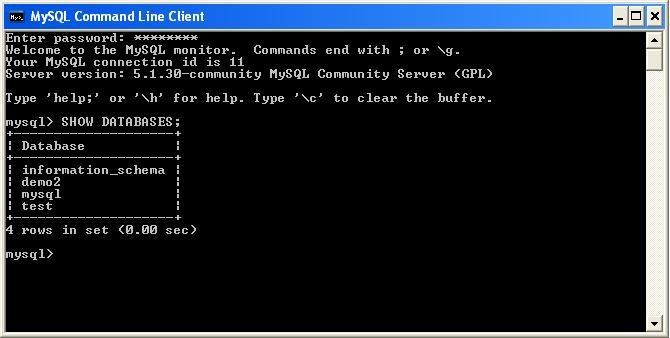
- Choose any table from the DATABASE. To view the tables in the DATABASE use the command SHOW TABLES;
- Now create the new user and Grant privileges to the new user like CREATE,INSERT,DELETE, e.t.c

- Login to newly created user: Before login to new user, firstly exit from MySql Command Line Client then after open Command prompt from start -> run -> cmd or command and choose the bin folder


Thursday, November 25, 2010
MAIN REASONS FOR COMPUTER RUNNING SLOW
Sometimes just 1 of the following causes the slow computer problem, yet more often than not it’s a combination of the below.
#Reason 1-Malware, Spyware, Virus and Hacker attacks and infections slow down your pc
When you use the internet for anything you run the risk of coming across bad things that can slow down your computer. For example: You might have looked at an email; viewed an email attachment; downloaded a song; viewed a website; clicked a link in your instant messaging program; or downloaded a program, etc…that contained malicious code.
To get rid of these parasite programs that are a huge cause of slow computers run Internet Security and Spyware scans.
#Reason 2 -Windows Registry errors
The windows registry is a core part of your computer system. The Windows Registry is a big database that contains information that most programs use for various purposes. The registry gets corrupted, has missing files and gets bloated over time. Registry errors can cause various problems and an unfortunate side effect is a significant decrease in computer speed.
To monitor and repair any registry errors you can use registry cleaner programs.
#Reason 3 -Your Hard-drive has reached or is near its maximum capacity to function efficiently
Computers have need of a certain amount of free space to operate properly. Your computer needs a minimum amount of free space for various activities such as file swapping, creation of temporary files, etc…
#Reason 4 -A badly fragmented drive
Files become fragmented overtime (pieces of a file become scattered over the hard-drive) and, it causes files to take longer to read and thus slows your computer down. Fragmentation is like putting 1 movie on 10 DVDs instead of a singular DVD, and thus you would have to open and close the DVD player many more times to watch the movie.
#Reason 5 -Too many programs running at one time
PCs have a limited amount of system resources and as such only enough memory and processing power to run x number of programs. The better computer specs (hardware) the more programs you can run.
#Reason 6 -Inefficient Internet Security or Antivirus program/s using too much memory/CPU
Internet Security/Antivirus programs are constantly running bucket loads of utilities in the background in order to protect your computer and, certain software packages are clunky and sluggish and consequently slow your computer down.
#Reason 7 -Not enough memory (RAM) installed
RAM stands for Random-access memory and is an important storage medium for your computer programs.
When the software you run on your computer goes beyond the memory capacity of your RAM it causes the computer to start utilizing the slower hard-disk drive for memory storage.
#Reason 8 -Only graphic intensive programs are slow
Are games or photo editing software running sluggish and slow? It’s likely your graphic card is not up to task and you should consider upgrading it.
#Reason 9 -Slow processor
Your Central Processing Unit is not fast enough to cope with the requirements of certain programs on your computer. For example: The Game Unreal Tournament 3 requires minimum 2.8 GHz CPU and, if your computer has below the minimum CPU reqs. then the game would not work or be sluggish and slow to play.
#Reason 10 -Automatic updates running in the background
Various programs search for updates every time they run; they download and install them in the background many times without your intervention. These automatic updates can slow down your computer, For Example: If you were watching a movie on your computer and your Internet Security decided to download updates it could slow down the movie (cause the movie to be played jerkily/or with lag).
#Reason 11 -Slow operating system (OS) or system heavy OS
Windows Vista has a bad reputation as it has been labeled as an OS that is slow. If you want Vista to be fast they say you need to borrow Bill Gates pimped out computer.
#Reason 12 -Computer Overheating (chiefly the CPU)
#Reason 13 - Computer system severely corrupted and the extreme measure of formatting the whole computer is required
Why is my pc slow? Well in rare circumstances you try all the normal solutions and come up empty. Then you need to resort to formatting the whole computer, reinstalling the OS and all your important files.
#Reason 14 -The computer is beyond repair
Why is my computer so slow? Well in very rare circumstances you can’t fix the slow computer problem no matter what you try, and the guy at the local computer shop is no help. So sadly you get a large paper weight computer and need to buy a new PC.
Hope I helped you,
Raghuveer
Subscribe to:
Posts (Atom)